
01

What EA actually sees when a seller signs in from abroad, what really gets accounts banned, and the 9 steps that keep your login safe.
You've just paid for a Comfort Trade. Ten minutes later your phone buzzes. EA says someone's trying to sign in from a city you've never been to.
EA ACCOUNT · ILLUSTRATIONNOW
New sign-in attempt
Someone is trying to sign in to your EA Account from a city you've never been to.
THE SELLER?A HACKER?A BAN INCOMING?
Your stomach drops. Is that the seller? Is that a hacker? And is your FC 27 club about to get wiped because of it?
The straight answer: a Comfort Trade login from another country is a new-device login to your EA Account, and EA doesn't publish whether location alone triggers a ban. The login country isn't the main danger. The danger is that EA's rules ban Comfort Trades and coin buying wherever the login comes from. A stranger holding your password is a security risk too. Comfort Trade is never zero-risk. If a foreign login worries you, use Player Auction, where nobody logs into your account at all.
WHAT THE LOGIN CAN DO
A security lock
EA resets your password when it spots unusual activity. Your club and purchases stay put. Annoying, but you can fix it yourself.
WHAT THE TRADE CAN DO
A coin wipe or ban
EA's rules name Comfort Trades and coin buying directly. That's where sanctions come from, whichever country the login shows.
That's the short version. Below is what actually happens during a Comfort Trade login, what EA really watches, and how to keep the risk as small as it gets.
A Comfort Trade means the seller signs into your EA Account, opens the Ultimate Team Web App, and moves the coins into your club through the Transfer Market. Your club, their hands, for as long as delivery takes.
To EA, that sign-in looks like a brand-new device. EA's page on two-factor authentication says it sends a code any time a new device tries to log in to your account. The seller doesn't have your phone or your inbox, so they can't receive that code.
That's where backup codes come in. EA's login verification guide explains that if you can't reach your normal verification method, backup codes are the only way to sign in from a new device. So a Comfort Trade seller asks for your email, your password and your backup codes. It's the full set of keys.
On their own device, wherever in the world they happen to be. EA has never seen that device before.
The code goes to your phone, your inbox or your authenticator app. The seller has none of them.
It's the only way past the new-device check without your normal verification method.
The seller opens the Ultimate Team Web App and transfers the coins into your club on the Transfer Market.
Delivery confirmed? Change your password and renew your backup codes the same day.
The same EA page also tells you never to share your login details, passwords or verification codes with anyone. That's the honest tension at the heart of every Comfort Trade.
One more mechanical detail matters. The Web App won't run while you're logged into Ultimate Team on your console or PC, as this FC 27 Web App guide points out. So if you jump into UT mid-delivery, you kick the seller out and stall your own order.
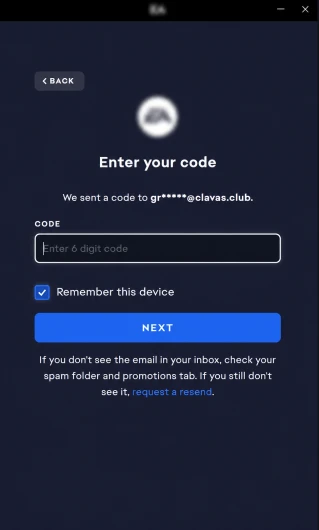 EA Account Login Verification Screen Asking for a Security Code after a Sign-In from a New Device
Not automatically, as far as anyone can prove. EA has never published a rule saying a login from another country triggers a ban. It doesn't publish its detection thresholds for anything, so anyone giving you an exact answer is guessing. What EA does publish is its unusual account activity policy. When something looks out of the ordinary, EA locks your account by resetting your password. Your progress and purchases stay put. EA lists logins from shared devices among the things it means by unusual activity. A Comfort Trade is literally a shared login.
So the realistic worst case from the login itself is a security lock and a password reset, not a ban. Annoying. Fixable. The ban risk comes from somewhere else: the trade. EA's sanctions for coin buying run from a coin wipe to a full account ban, and the login is simply how the seller gets in to do it.
Here's the case that should make you think. On EA's forums, an FC 27 player found logins from Los Angeles, Tokyo and Piscataway, New Jersey, on one day in October after downloading their EA account data. They were in Portugal at the time. Their account then got hit with a coin-distribution ban, and appeals came back with generic rejections.
ONE DAY IN OCTOBER · AS REPORTED BY AN FC 27 PLAYER ON EA'S FORUMS
LOGINLos Angeles, USANOT THE OWNER
LOGINTokyo, JapanNOT THE OWNER
LOGINPiscataway, New Jersey, USANOT THE OWNER
OWNERIn Portugal the whole timeREAL PLAYER
What followed: a coin-distribution ban, and appeals answered with generic rejections. Illustration of the player's account, not EA's own log format.
That was a hacked account, not a coin order. But it shows two things. Foreign logins can sit right next to a coin-distribution sanction. And "it wasn't me" doesn't get far once the sanction lands.
No sugar-coating here, because you deserve the full picture before you spend anything. EA's FC rules call out Comfort Trades by name. Its EA SPORTS FC rules page says buying coins from a third party is against the rules. It also lists performing Comfort Trades as something that harms the game economy.
EA's coins and FC Points safety page spells out what it can do if you break those rules:
| What EA can do | What it means for you |
|---|---|
| Remove your Ultimate Team coins | The coin balance goes |
| Restrict your Transfer Market access | No buying or selling cards |
| Delete your Ultimate Team club | The whole club is gone |
| Ban you from the current FC game, all FC games, or some or all EA games | Online play gone, possibly beyond FC |
| Suspend your console from FC online modes | The device gets hit, not just the account |
EA also flags the security side. Its FC Mobile rules warn that third-party coin sellers need your login information, and that this puts you at risk from phishers.
So the login country is a side issue next to the rule itself. A seller logging in from your own street would still be doing a Comfort Trade.
A seller logging in from your own street would still be doing a Comfort Trade.
No. It sounds clever. It isn't a safety feature.
A VPN changes the location EA sees. It doesn't change the device. Your sign-in still comes from a machine EA has never seen, still needs a backup code, and still counts as a shared login. And EA's rules don't care where a Comfort Trade comes from.
There's also a reasonable worry that jumping between locations looks odder, not less odd. One FC 26 player on EA's forums suspected their work VPN's constant location changes were behind their Transfer Market ban and asked EA for a manual review. That's one player's theory, not EA policy. But it shows VPN logins don't make anyone invisible.
If a seller's whole safety pitch is "we'll use a VPN in your country", ask what else they've got. The things that actually matter are a written guarantee, a track record, and a delivery that looks like normal trading.
The biggest Comfort Trade risk is the trade pattern being flagged, not the country of the login. Here's where the risk actually sits during a Comfort Trade, from most to least likely to bite. These are based on EA's published rules and security pages and what players report on EA's forums. EA doesn't publish odds for any of them.
| # | Risk | What it looks like | What lowers it |
|---|---|---|---|
| 1 | The trade itself gets flagged | Coin wipe or Transfer Market ban days later | A seller who prices and paces delivery like normal trading. Sensible order sizes. |
| 2 | A security lock | EA resets your password after spotting unusual activity | Expect it as a possibility. Reset, secure the account, carry on. |
| 3 | You log in mid-delivery | Two sessions fighting over one club. The Web App drops out. | Stay off UT, the Web App and the Companion App until the seller confirms. |
| 4 | The seller keeps access | Your codes and password still work for them after delivery | Change your password and renew your backup codes straight after. |
| 5 | Your codes leak further | Phishing, or a dodgy seller reselling details | Only use a seller with a long public review history. Never paste codes into random chats. |
| 6 | Location-hopping logins | Several countries in a short window | One seller, one delivery, no VPN tricks |
Notice what's top of the list. It's the trade pattern, not the postcode. We went through what EA checks on the trade side in our Comfort Trade vs Player Auction safety comparison.
On the login question, yes, clearly. With Player Auction, nobody signs into your account. You list a card on the Transfer Market and the seller buys it. Your password, your codes and your devices never leave your hands.
It's not zero-risk either. Player Auction still moves coins through a trade EA can review, and it's slower because you're doing the listing yourself.
| Player Auction | Comfort Trade | |
|---|---|---|
| Who logs in | Only you | The seller from their device |
| Backup codes shared | No | Yes |
| Foreign-login worry | None | That's the trade-off |
| Main risk signal | The price on the auction | The shared login plus the coin movement |
| Effort for you | You list cards | Hands-off |
| Best for | Cautious buyers, smaller orders | Bigger orders, people short on time |
At WhatsGaming you get both options, so you're not forced into handing over your login. Player Auction runs on PlayStation and Xbox. PC players use Comfort Trade. More than 1,000,000 players have taken coins through our Player Auction, and over 100,000 Comfort Trade orders have gone through.
To be fair to you, our own Trustpilot page has a review from a long-time Player Auction customer who switched to Comfort Trade for FC 26 and wasn't happy with how it ended. That's exactly why we tell nervous buyers to stick with Player Auction if they can.
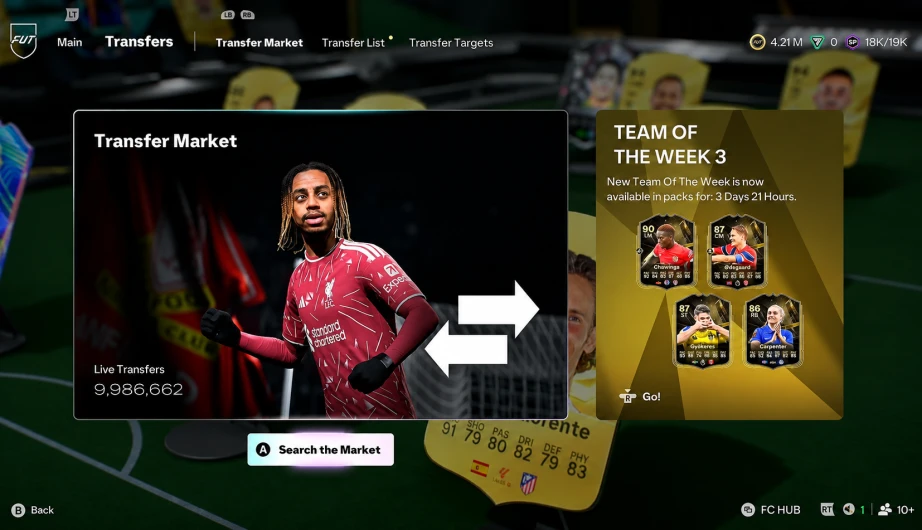 Listing a Player on the FC 27 Transfer Market for a Player Auction Coin Delivery, with No Seller Login Needed
Both methods need an open Web App Transfer Market on your club. If yours is still locked, EA's Transfer Market access rules explain how active days work. Brand-new to Ultimate Team? Our FC 27 beginner's guide covers the first squad while you wait.
To lower your Comfort Trade login risk, check your record and 2FA before the trade, stay off the account during delivery, and change your password and backup codes straight after. Going ahead with a Comfort Trade anyway? Fair enough. Here's how to keep the login side as tidy as possible.
First, work out which one it is, because a lock and a ban are very different problems.
A LOCK
A password problem
EA has reset your password over unusual activity. Your club and purchases are still there. Reset the password, turn on 2FA, renew your backup codes, and you're back in. Annoying, not fatal.
A SANCTION
A rules problem
A coin wipe, a Transfer Market restriction or a ban. It shows up in Penalty History, and you can only get it reversed through an appeal.
For a sanction, open Penalty History through EA's bans and appeals page, find the violation and read the details. Only appeal if you genuinely think EA got it wrong, because misusing appeals breaks EA's rules too. Expect slow, template-style replies. That's what most players report on EA's forums.
Then contact your seller. At WhatsGaming, if EA acts against your account within 72 hours of delivery, you get your money back under our 72-hour money-back guarantee. It won't restore a wiped club, but it means you're not out of pocket.
Yes, in practice. A seller signing in from a new device can't receive your 2FA code, and EA says backup codes are the only way in from a new device without it. That's why every Comfort Trade asks for them. Renew them straight after delivery so the old set stops working.
Usually you'll hit EA's verification step, because EA sends a code whenever a new device tries to sign in. The seller uses a backup code to get past it. You may also get an unusual-activity email if EA resets your password. Either way, confirm with your seller before you touch anything.
No. The Web App won't work while you're in Ultimate Team on console or PC, so playing kicks the seller out and stalls your order. Stay off Ultimate Team, the Web App and the Companion App until delivery is confirmed.
No. EA's FC rules say buying coins from a third party is against the rules, and they list Comfort Trades as harming the game economy. Penalties range from a coin wipe up to account bans. Any seller who says Comfort Trade is "allowed" isn't being straight with you.
No. A VPN only changes the location EA sees. The sign-in still comes from a new device, still needs a backup code and is still a Comfort Trade under EA's rules. Judge a seller on a written guarantee and a public review history, not on location tricks.
Yes. EA lets you request a copy of your account data, and players on EA's forums have used it to see which locations signed in. It's a request, not a live dashboard, so use it to check afterwards rather than during a delivery.
It's low risk and covered, not zero risk, because Comfort Trade breaks EA's rules wherever you buy. WhatsGaming has been running since 2017, with 408,000+ orders delivered and a stated incident rate below 0.1%. It holds a 4.7 Trustpilot score from over 1,700 reviews, and every order has a 72-hour money-back guarantee. Worried about logins? Pick Player Auction instead.
Three things to take away:
When you're ready, grab your FC 27 coins from WhatsGaming. Pick Player Auction if you'd rather keep your login to yourself, or Comfort Trade if you want it hands-off. The 72-hour guarantee covers both.
60 hours of grinding? No thanks. Coin delivery starts instantly, backed by 100K+ players and a 72h money-back guarantee.
Still playing last season? FC 26 coins work the same way.
Every claim about EA's rules and security steps comes from EA's own help pages. Player cases are labelled as player reports, not EA policy.
ABOUT THE AUTHOR
Parth Raj writes Ultimate Team guides for WhatsGaming, covering the transfer market, coin delivery methods and account safety. WhatsGaming sells FC coins, so this guide states the risks of its own delivery methods plainly. Last updated 16 November 2026.
Debut cards hit the market at launch. Have the Coins ready before prices spike.


